Download AndroRAT for Windows 2026

Free download Download AndroRAT for Windows 2026 v2.0 10 MB · Windows · 83,449 downloads

Overview

AndroRAT for Windows installation setup equips cybersecurity researchers, ethical hackers, and mobile system administrators with an open-source Remote Access Tool (RAT) server environment designed to monitor Android client devices. Short for “Android Remote Administration Tool,” AndroRAT operates using a client-server architecture where a Windows-based command-and-control GUI manages payload execution, diagnostics, and telemetry logs.

AndroRAT for Windows functions as a lightweight, open-source penetration testing utility and remote administrative platform created to analyze communication channels between host servers and Android client environments. Originally developed in Java and extended via Python-based listener scripts, AndroRAT demonstrates how remote sockets exchange commands, establish persistent connections, and stream diagnostic metadata over local network interfaces or forwarded IP routes. Security teams and ethical researchers deploy AndroRAT within isolated virtual laboratories to evaluate mobile endpoint vulnerabilities, simulate privilege escalation vectors, and assess local data loss prevention (DLP) frameworks.

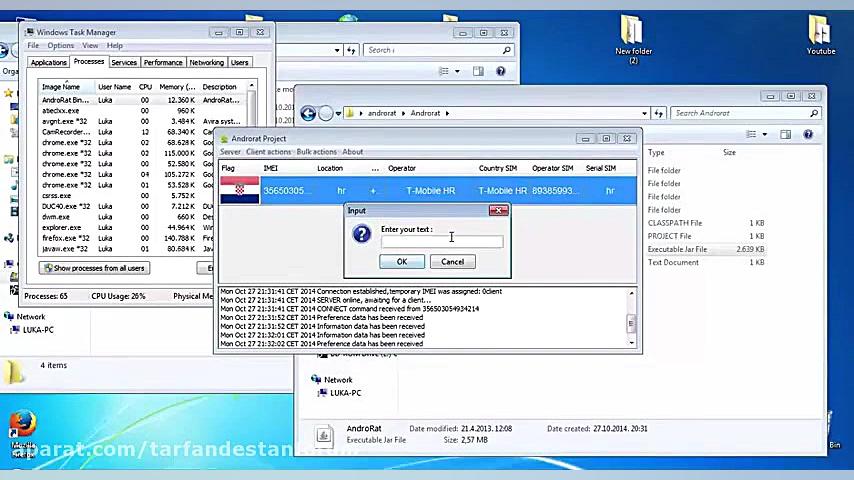
The desktop control console running on 94fbr Windows acts as the central command hub. Once an administrator builds and deploys the corresponding client payload. onto a target test device, the Android client initiates an outbound socket request back to the host Windows listening IP address and port. Upon connection establishment, the Windows GUI server enumerates device hardware profiles, triggers background diagnostic routines, and processes incoming data telemetry in real time.

Unlike commercial device management suites, AndroRAT operates directly over TCP/IP sockets without relying on third-party cloud relays or proprietary backend servers. This self-contained architecture gives security professionals full visibility into raw network packets, allowing analysts to monitor incoming call logs, SMS message stores, location coordinates, camera streams, and local file storage systems. Because modern security suites inspect socket behavior aggressively, ethical researchers also use AndroRAT to study how endpoint detection and response (EDR) agents identify unauthorized administrative channels across enterprise wireless networks.
Screenshots

Download AndroRAT for Windows 2026 screenshot 1

Features

  • Centralized Desktop Listener Console: Manages multiple remote client connections simultaneously through a unified Windows control interface.
  • Real-Time Telemetry & SMS Monitoring: Retrieves SMS message histories, incoming/outgoing call logs, and contact lists directly from connected client devices.
  • Remote Media & Audio Capture: Triggers camera snapshots, streams live video feeds, and records ambient audio snippets from the client device on command.
  • GPS & Cell-Tower Location Tracking: Queries mobile hardware GPS modules to fetch geographical coordinates and device movement logs.
  • File System Explorer: Browses internal flash storage and external SD card directories to download or upload test payloads and configuration files.
  • Shell Command Execution: Executes native shell commands directly on the client OS to test privilege levels and system responses.

Requirements

Version
v2.0
File size
10 MB
Platform
Windows
Requirements
Windows 10 or Windows 11, 4 GB or more
Developer
AVG Technologies
Licence
Proprietary
Language
Multiingual
Release date
Aug 29, 2026
Downloads
83,449

How to install

  1. Install Runtime Dependencies: Download and install Java Development Kit (JDK) and Python 3.x on your Windows PC. Ensure you check Add Python to PATH during installation.
  2. Download AndroRAT Package: Download the official AndroRAT source archive from the verified GitHub repository onto your machine.
  3. Extract Project Archive: Right-click, select Extract All, and choose your target directory.
  4. Configure Firewall & Listener Port: Open Windows Defender Firewall, create an inbound traffic rule for your designated listening port, and grant TCP communication permissions.
  5. Launch Server Listener: Open Command Prompt, navigate to your extraction folder, and execute the server launcher command  to open the control dashboard.

Pros & cons

Pros

  • Lightweight open-source setup requires minimal RAM and CPU processing power.
  • Self-contained local socket server eliminates reliance on external cloud services.
  • Provides raw network visibility ideal for cybersecurity students and malware analysts.
  • Direct TCP communication enables low-latency command execution across local lab environments.

Cons

  • Requires manual Java Development Kit (JDK) or Python environment configurations on Windows.
  • Lacks modern graphical polish compared to enterprise mobile device management (MDM) platforms.

Related in 94fbr Android

View all

Leave a reply