MTK Universal Tool for Windows V2 Unlock Screen Lock

Free download MTK Universal Tool for Windows V2 Unlock Screen Lock 2027 65 MB · Windows · 71,625 downloads

Overview

MTK Universal Tool for Windows mobile device maintenance utility designed for Android smartphones equipped with MediaTek (MTK) chipsets. Its goal is to help mobile device repair technicians and advanced Android users perform maintenance, software management, and troubleshooting tasks. MediaTek processors are commonly found in smartphones from manufacturers such as Infinix, Tecno, Xiaomi, OPPO, Vivo, and other brands that use Android. The tools in this category offer a practical interface for interacting with compatible devices through USB connections and specific operating modes.

The primary function of MTK Universal Tool is to simplify technical tasks that would otherwise require the use of multiple utilities or command-line procedures. Depending on the specific version, its functions may include device detection, reading chipset information, firmware-related operations, factory reset, and partition-level maintenance. However, not all versions offer the same capabilities; Compatibility depends on the phone model, chipset generation, firmware configuration, and Android security patch.

A fundamental aspect in the maintenance of MediaTek devices is the communication process between the computer and the smartphone. Many MTK-based devices support specialized connection modes, such as “Preloader” and “BootROM” (BROM). These modes allow authorized maintenance tools to communicate with the phone at a deeper software level. MTK Universal Tool for Windows can use different connection methods, depending on its version and device configuration. It is also essential to have the correct USB drivers, as Windows must recognize the smartphone before any maintenance application can establish communication with it.

You can also download: TFM Tool Pro Installation Windows Setup and Troubleshooting
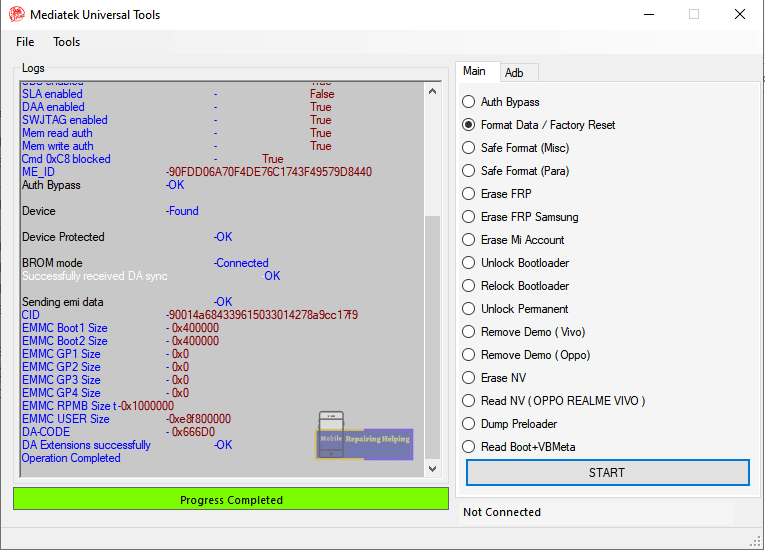
Screenshots

MTK Universal Tool for Windows V2 Unlock Screen Lock screenshot 1

Features

  • The following features describe common capabilities associated with service tools for MTK devices. Actual availability depends on the specific version of the MTK Universal Tool.
  • - Device Information Detection: Identifies connected MediaTek devices that are compatible and displays available hardware information.
  • - MTK chipset compatibility: Provides communication functions for certain Android smartphones equipped with MediaTek processors.
  • - USB device detection: Facilitates communication between a Windows computer and a connected smartphone.
  • - Firmware maintenance: Allows you to perform firmware-related maintenance operations on compatible devices.
  • - Partition management: Provides access to partition-level maintenance functions on compatible devices.
  • - Factory reset: Includes functions to reset the device, available for compatible equipment and under proper authorization.
  • - Device maintenance: Helps technicians troubleshoot software problems on certain smartphones.
  • - Communication via Preloader: Enables communication with compatible devices through MediaTek's "Preloader" mode.
  • - BootROM compatibility: Some versions offer BootROM level communication for compatible hardware configurations.
  • - Technician-oriented interface: Groups available maintenance operations into a graphical interface for easy access.

Requirements

Version
2027
File size
65 MB
Platform
Windows
Requirements
Windows 10, Windows 11, 64-bit, RAM: 8 GB minimum,
Developer
MTK
Licence
Proprietary
Language
Multilingual
Release date
Jun 5, 2026
Downloads
71,625

How to install

  1. Follow these general installation steps for a legitimate and verified package.
  2. 1. Check the software package: Confirm the exact version of MTK Universal Tool and its source before obtaining the installer or file.
  3. 2. Analyze the files: Use Windows Security or a trusted antivirus program to scan the package.
  4. 3. Extract the file: If the software is provided in ZIP, RAR or 7Z format, extract it using a compatible decompression utility.
  5. 4. Install the necessary drivers: Install compatible MediaTek USB drivers from a trusted source if your maintenance workflow requires them.
  6. 5. Open the software folder: Locate the main executable file of the application after extraction.
  7. 6. Start the application: Run the file following the developer's instructions.
  8. 7. Connect your device: Use a suitable USB cable to connect a compatible MediaTek smartphone.
  9. 8. Check device recognition: Verify that Windows and the application recognize the connected device.
  10. 9. Check compatibility: Confirm the model, chipset, firmware, and supported operation before proceeding.
  11. 10. Initiate authorized maintenance: Only perform maintenance operations compatible with your device and, whenever possible, create a backup beforehand.

Pros & cons

Pros

  • User-friendly interface for technicians: It offers a graphical environment for performing maintenance and service tasks.
  • Focused on MediaTek: Designed with the communication requirements of MTK-based devices in mind.
  • Multiple functions: Some versions integrate various device maintenance operations.
  • Windows Compatibility: Designed for use on computers with the Windows operating system.
  • USB connectivity: Communicates with compatible smartphones via USB connections.

Cons

  • Unclear developer: There is no consistently verified official information available about the developer.
  • Version confusion: Several packages use similar software names.
  • Limited compatibility: Not all smartphones with a MediaTek processor are compatible.
  • Security risks: Unverified third-party packages may contain modified or unsafe files.
  • Limitations in documentation: It is difficult to verify the existence of reliable official manuals or release notes.

Related in Mobile Tool

View all

Leave a reply