SamFw Tool for Windows Latest Version 2026 Setup

Free download SamFw Tool for Windows Latest Version 2026 Setup 2027 10 MB · Windows · 15,220 downloads

Overview

SamFw Tool for windows is a Samsung smartphone maintenance utility, designed for the Windows operating system, that helps mobile device technicians perform various maintenance tasks and software-related operations. It is especially known for its support for Samsung devices, its firmware-relate functions, ADB communication, and its diagnostic capabilities. The software offers a graphical interface that brings together various maintenance options, eliminating the need to switch between different tools to perform compatible tasks.

SamFw FRP Tool 6.2 is primarily gear towards Samsung Galaxy series smartphones and tablets. It is used by mobile device repair professionals who need to identify connect equipment. Look up information about it, and perform maintenance operations. Available features may vary depending on the device model, Android version, security patch, and connection mode. Therefore, it is essential to verify compatibility before starting any operation.

One of the key components of 94fbr SamFw Tool for windows is its functionality for communicating with devices. The application can interact with compatible Samsung devices through various connection modes, such as ADB and “Download Mode”. ADB (Android Debug Bridge) allows a computer to communicate with an Android device as long as USB debugging is enable and authorized. Meanwhile, “download mode” is a specific mode for Samsung devices, commonly used for firmware-related maintenance tasks. These communication methods allow technicians to access device information and perform compatible operations.

You can also download: TFT MTK Module Tool v7.0.0 Download (Latest 2027)
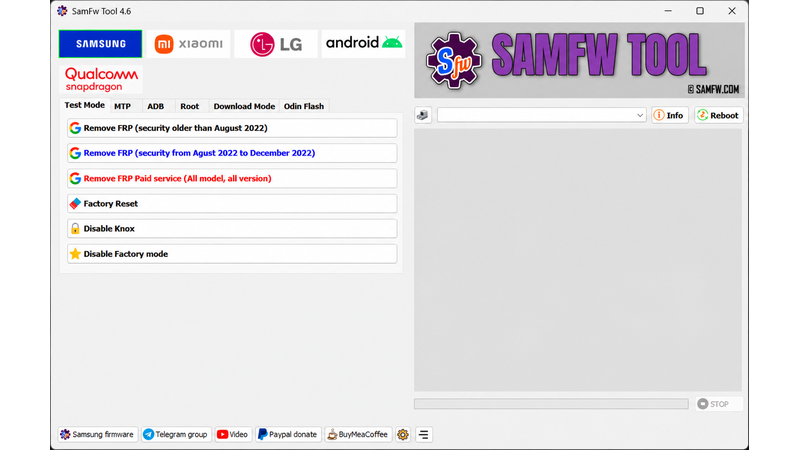
Screenshots

SamFw Tool for Windows Latest Version 2026 Setup screenshot 1

Features

  • Samsung Device Information: Reads available smartphone information through supported connection modes.
  • ADB mode compatibility: Enables communication with the device and offers specific maintenance functions via Android Debug Bridge (ADB).
  • MTP mode compatibility: Provides information about the device and allows maintenance operations to be performed via MTP connectivity.
  • Download Mode for Exynos: Version 6.2 introduces additional functionality for download mode on devices with Exynos processors.
  • EDL 9008 support: Offers specific maintenance functions for compatible devices via Qualcomm’s Emergency Download Mode (EDL).
  • Firmware installation using Odin: Includes an interface for Odin-based firmware installation, with automatic file extraction.
  • CSC Management: Provides configuration functions related to the CSC (Consumer Software Customization) for compatible Samsung models.
  • MediaTek compatibility: Includes functions for factory reset, user data formatting, and bootloader maintenance.
  • Compatibility with Xiaomi devices: Offers specific functions related to ADB, Fastboot and EDL.
  • LG Device Compatibility: Includes device information and maintenance functions for LG terminals.
  • Application management: Allows the installation and management of certain Android applications.
  • Battery information: Read the available data about the battery on compatible Android devices.
  • Driver Installation: Includes functionality to install Samsung USB drivers.
  • Operation logs: These help technicians review the results of software operations and diagnose errors.

Requirements

Version
2027
File size
10 MB
Platform
Windows
Requirements
Windows 10, Windows 11, 64-bit, RAM: 8 GB minimum,
Developer
Samsung firmware
Licence
Proprietary
Language
Multilingual
Release date
05 Nov 2026
Downloads
15,220

How to install

  1. Follow these steps to prepare the application for legitimate maintenance of your device:
  2. 1. Visit the official website: Access the SamFW website and locate the information about SamFW Tool version 6.2.
  3. 2. Verify the package: Check the version number, developer information, and details of the available files.
  4. 3. Analyze the file: Examine the ZIP package with a trusted security tool before extracting its contents.
  5. 4. Extract the files: Use 7-Zip or a compatible decompression utility to extract the installation files.
  6. 5. Install Samsung drivers: Install the appropriate Samsung USB drivers, if required for your device.
  7. 6. Install dependencies: Check if the application requires Microsoft Visual C++ components.
  8. 7. Start SamFw Tool: Open the main executable file following the developer's instructions.
  9. 8. Connect your smartphone: Connect a compatible Android device using a reliable USB cable.
  10. 9. Check device recognition: Confirm that Windows recognizes the connected smartphone.
  11. 10. Check compatibility: Review the device model and supported features before performing any maintenance tasks.

Pros & cons

Pros

  • Multi-device platforms: Offers features for various smartphone brands.
  • Free basic utility: Provides a range of maintenance functions without requiring payment for each operation.
  • Odin integration: Includes firmware-related operations for compatible Samsung devices.
  • Multiple connection modes: Supports different communication methods for device maintenance.
  • Improvements for Exynos: Version 6.2 introduces additional features related to Exynos.
  • Interface adapted for technicians: Organizes various operations in a single application.

Cons

  • Device compatibility: Not all features are compatible with all smartphones.
  • Security limitations: Antivirus software may flag certain components; These warnings should be analyzed instead of automatically ignored.
  • Required technical skills: Some operations require experience in firmware handling and smartphone maintenance.
  • Paid services: Some services may require an additional payment.
  • Risk of data loss: Factory resets and partition-related operations may erase personal information.
  • Third-party software: Users should evaluate the authenticity and security of the installation package.

Related in Mobile Tool

View all

Leave a reply