Hydra Tool Pro Download All Mobile Servicing Utility for PC

Free download Hydra Tool Pro Download All Mobile Servicing Utility for PC 2026.3.21.0 17.27 MB · Windows · 54,815 downloads

Overview

Hydra Tool Pro Download is a professional mobile device service and repair tool, designed for technicians working with various brands of Android smartphones and hardware platforms. Developed by the Hydra team, this software offers a suite of features for device communication, firmware maintenance, diagnostics, and other support tasks, all through a Windows-based interface. The tool is compatible with multiple mobile platforms, including MediaTek, Qualcomm, Unisoc, and other hardware configurations.

One of Hydra Tool Pro download 2027 main objectives is to simplify smartphone maintenance by integrating various technical operations into a single application. Repair technicians can use its various modules to identify connected devices, establish communication with phone chipsets, manage firmware-related operations, and perform software maintenance procedures. Instead of relying on separate tools for each type of chipset, users can access different service modules within the Hydra environment.

The v2026.3.21.0 update focuses on improving stability, optimizing performance, and expanding device compatibility. According to the release announcement, the development team has fixed several reported problems, optimized various functions, added more compatible models to the “OneClick” modules, and incorporated new DA (Download Agent) and Firehose loaders. These improvements aim to expand compatibility in communication with devices and offer a more reliable service experience.

Hydra Tool for PC also features a modular architecture that separates the different device platforms and technical service operations. Its “OneClick” module is compatible with protocols such as ADB, Fastboot, MediaTek, META mode, Qualcomm, and Unisoc. Depending on the device and the active license, technicians can access available operations through the corresponding module. Furthermore, its database-based structure allows for online updates of certain operations and device compatibility information, without the need to completely replace the application.

You can also download: UnlockTool USB Driver Setup Latest Version 2027
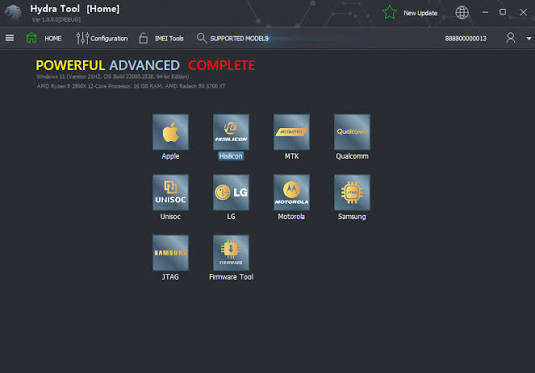
Screenshots

Hydra Tool Pro Download All Mobile Servicing Utility for PC screenshot 1

Features

  • Multi-brand device support: Offers service features for compatible smartphones from various manufacturers.
  • "OneClick" module: Provides a centralized interface for performing specific mobile device repair operations.
  • MediaTek Compatibility: Supports communication and service protocols for certain MediaTek devices.
  • Qualcomm Support: Allows you to perform service operations on Qualcomm devices using compatible configurations.
  • Unisoc Support: Includes communication and maintenance features for selected Unisoc devices.
  • ADB Communication: Allows compatible Android devices to communicate with the computer via ADB.
  • Fastboot support: Facilitates maintenance operations on compatible devices using the Fastboot protocol.
  • META mode support: Enables communication with MediaTek devices via META mode.
  • Additional DA Loaders: Version 2026.3.21.0 incorporates additional "Download Agent" (DA) loaders to expand compatibility with more devices.
  • Firehose Charger Support: Adds additional Firehose charger configurations for compatible Qualcomm devices.
  • Expanded model database: Includes more compatible smartphone models within the "OneClick" modules.
  • Performance optimization: Improves the operation of certain software functions.
  • Stability improvements: Includes fixes for reported issues in the application.
  • Online database updates: Allows for online updates of information and available operations for compatible devices.

Requirements

Version
2026.3.21.0
File size
17.27 MB
Platform
Windows
Requirements
Windows 10, Windows 11, 64-bit, RAM: 8 GB minimum,
Developer
hydradongle
Licence
Proprietary
Language
Multilingual
Release date
Mar 20, 2026
Downloads
54,815

How to install

  1. Visit the official website: Access the Hydra Tool website and go to the software download section.
  2. Get the installation package: Select the Hydra Tool installer that's right for your Windows computer.
  3. Analyze the installer: Examine the installation package using a trusted security application.
  4. Run the installation file: Open the installer and follow the on-screen instructions.
  5. Complete the installation: Choose an appropriate installation directory and let the process finish.
  6. Start Hydra Tool: Open the application from the shortcut on the desktop or from the installation folder.
  7. Configure your digital license: Log in with your registered Hydra digital account.
  8. Configure the physical key (dongle): If you are using a hardware license, select "Switch Dongle" and install the necessary "SmartCard Alcor" driver when prompted.
  9. Update the database: Allows the application to synchronize its database of devices and compatible modules.
  10. Check device connectivity: Connect a compatible smartphone and verify that the necessary USB drivers are installed.
  11. Check compatible functions: Verify the device model and available operations before starting any service procedure.

Pros & cons

Pros

  • Multi-platform compatibility: Integrates various service modules for mobile devices into a single application.
  • Periodic updates: Includes improvements to the software and the device database.
  • One-click operations: Simplifies access to supported maintenance functions.
  • Additional chargers: Version 2026.3.21.0 expands the availability of DA and Firehose chargers.
  • Professional interface: Designed for technicians working with multiple smartphone platforms.
  • Flexible licensing: Supports digital licenses as well as activation via compatible physical devices (dongles).

Cons

  • Activation: Full access requires an appropriate commercial license.
  • Technical knowledge: Advanced maintenance functions require experience.
  • Internet dependency: Some functions require access to online databases and servers.
  • Device limitations: Not all smartphone models support all operations.
  • Credit requirements: Certain services require additional credits.
  • Hardware compatibility: Some features depend on specific device modes, drivers, or hardware configurations.

Related in Mobile Tool

View all

Leave a reply